Showing posts with label Facebook. Show all posts

Friday, September 26, 2008

What not to do on Facebook

TechRadar.com has a great piece on the Top 15 things you should never do on Facebook. I happen to agree with most of them, while some are just filler.

Here's a few I thought were spot on:

1. Use Facebook mail instead of proper email
Are you silly? When you Facebook mail me, I have to log into my real email to find that I then have to go and log into my Facebook account to read and reply to your message. If you've got my real email address, please use it.

7. Write on a wall instead of communicating privately
The driving force behind the success of Facebook is... vanity. People love the idea that others are watching what they're doing. Tell me this: for what reason would you invite someone to a private party by writing on their wall, other than to show off to all the people on their friends list who you don't want to come? It just makes you look like a tit, so don't do it.

10. Upload drunken pictures the morning after
Have a little common sense. If you go out for a big one on a Wednesday night, posting humiliating, drunken photos of your friends on Thursday morning is a recipe for disaster. Because when I call in sick at 9am, the last thing I want my boss to say is: "I've seen the pictures of you crawling in the gutter last night. I'm not amused or impressed, now get to work!"

11. Joining ridiculous chain-mail groups
Why do people insist on joining groups such as "On the X of May, everyone has to panic buy carrots"? Come on people, how stupid are you? There's one group on Facebook devoted to nullifying the vegetarian moral crusade, and it's called: "For every animal you don't eat, I'm going to eat three". That's a good group name. "I think Ryan Seacrest is the best presenter ever" is not.

If you haven't read it yet, I suggest taking a look at my piece on social networking best-practices here - Want to be President? Better shut down your Blog, Facebook, MySpace, and Twitter accounts

Saturday, September 6, 2008

Want to be President? Better shut down your Blog, Facebook, MySpace, and Twitter accounts

We live in a new world where personal information is shared faster, and in higher quantity, than ever before. I'm more guilty than most.

I was out with friends last night, and remarked that there weren't many embarrassing pictures of me in college because it was still the age of film, where each picture cost money. Before digital cameras were cheap and available, you had to really go out of your way to take embarrassing pictures. Not anymore.


I have relatives and friends going through college now, and the sheer number of embarrassing pictures I see is overwhelming. It reflect the reduced cost of taking pictures, and the ease of sharing our lives.

They then post those pictures to their Facebook profiles, put them on their blogs, share them on MySpace, post videos to YouTube, and tweet them to random people around the world using Twitter. Esteemed colleagues do the same. They say it helps them add character on the web, and they like to share their lives with friends. But sometimes, being too open can get you in trouble.

It's exciting, it connects us, and it's also very dangerous, and pictures aren't the only problem!

Think about your existing blog rantings in the context of applying for a CEO position, or running for public office, 20-30 years from now. Chances are, if you inventory your publicly accessible social networking and blog information today, you wouldn't even make it to city council or head of the PTA!

Go ahead, Google yourself right now, I'll wait. What did you find?

Am I saying that you are a bad person?
No, but fact is, we are sharing the most intimate details of our lives to thousands of strangers, but not always thinking about the consequences. Especially young professionals and people still in high-school and college. Our parents did all of the same things we do, but they didn't make an underground newspaper about it and pass it to their friends. That is in essence what we are doing.

Pictures that seem funny now, might haunt you the rest of your life. Blog posts where you fly off the handle and stream expletives about that, "$%^&* guy that ^&U*I cut you off was a stupid &#$%^", very well might cost you a lot in the long run. Drunk-dail Twitters about your latest one-night stands are NOT such a good idea.

Here's a few tips to keep your public profile PG-13 while still having fun.

  • If you are prone to using a lot of language, make sure your public streams are available only to those that know you and can take it in context. Lock your profiles down so that only friends can access what you are writing.
  • Keep any public pictures on your blog or social networks as clean as possible. No nudity or lewd poses. Post all the good stuff in your private by-invite only profile.
  • Share your private by-invite profile with only those that you trust completely. Over 20-30 years, relationships change, and you would be very surprised by who might turn against you in the long run.
  • Use an untraceable alias when making comments on the internet, one that can't be traced back to you. Unless you carefully think about everything you post, anything you say can and will be held against you.
  • Think about how anything you write publicly might sound if read in the court of law, or by an angry newscaster.
  • Maintain a countering public profile that your professional network can access. It can contain some character, but not too much.
  • Remember that even if you delete something, Google is forever. There might be archives accessible of your blog or pages available for the rest of your life, and much longer.
Take a look at how the press found Levi Johnston's MySpace page and dissected it as soon as the McCain campaign announced Bristol Palin's pregnancy. The rantings of a 18-year old "f**king redneck" can look pretty serious when put into a newspaper.

So my suggestion to you is to be careful about what you are posting for others to read. It might just come back and haunt you.

Many people forget that at 13-30 years old we are all pretty angry and say things we don't mean in the long run. It used to be locking yourself in your room and blasting the music, or sneaking out at night to dance in an abandoned barn in the country.

So instead of that angry blog, have you tried cigarettes, drinking, and dance?

Wednesday, August 20, 2008

How to update your Facebook status with Twitter

Have you ever wanted to quickly update your Facebook status and Twitter status at the same time? Did you know that Twitter can automatically update your Facebook status on every tweet?

Using Twitter to update your status makes your Facebook profile much more timely, interactive, and personal.

With Twitter you can update by SMS, text message, mobile clients like Twitterriffic, through the web, or a myriad of desktop clients. You are much more likely to update by these methods than logging into the web to update Facebook, or using a Facebook specific mobile client.

The best part of this setup is that it only publishes original tweets, not replies or direct messages. This means your profile is always updated with what YOU are doing.

The setup is incredibly easy, just you follow these simple steps.

Instructions for the NEW Facebook:
  • First, login to Facebook.
  • Then go to the Facebook Twitter Application and click the Add Application button.


  • Make sure to give Facebook all the permissions it needs to access your profile.
  • Enter your Twitter username and password when asked.
  • Once back at your profile, click the Applications menu at the top of your home page in Facebook.
  • Select the Twitter application from the drop down list.
  • You will now see the Twitter application and all your, and your friends, recent Tweets.
  • Select the Applications menu again, and select Edit Settings for Twitter
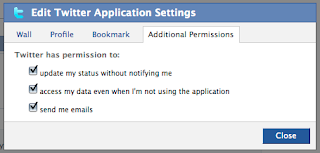
  • You will now see a dialogue box to Edit Twitter Application Settings.
  • Click on the Additional Permissions tab and you will see a listing of options.
  • Check the option to "update my status without notifying me" and save your changes.
  • You're done!


Instructions for the OLD Facebook:
  • Configuring Twitter on the OLD Facebook is much easier than the NEW Facebook.
  • First, login to Facebook.
  • Then go to the Facebook Twitter Application and click the Add Application button.


  • Make sure to give Facebook all the permissions it needs to access your profile.
  • Enter your Twitter username and password when asked.
  • Once you have entered your username/password, simply click the button in the Twitter Facebook Application that says "Allow Twitter to Update Your Facebook Status".
  • You're done!


As simple as that, every time you Tweet, your NEW Facebook status will change! Enjoy!