
It's amazing the ways in which Twitter is being used. What started out as a micro-blogging service for narcissists, is now providing real-time news, organizing people, and insight into the lives of people like Lance Armstrong and Shaq, and people who are next door neighbors but more fascinating that we had imagined.
Over the weekend, a terrifying plane accident in Denver occurred, where a Continental plane slid off the runway at Denver International Airport. How did I hear about it? Was it the local newspaper or television station? No, it was spreading like wildfire on Twitter.
Boulder software engineer Mike Wilson was on the plane, and started twittering what was going on immediately after he escaped the burning wreckage. With the telephone lines overloaded, it provided him contact with friends and family and let them know he was okay. Additionally, it allowed people in Denver to see what was going in a faster and more personal way than the local television stations could offer.
During the attacks in Mumbai, the twitter tag #mumbai providing an amazing real-time look from people on the ground. Everything from the worldwide reaction and sympathy, to the first-hand experiences of those who were experiencing the event first hand. It personalized the news from thousands of miles away, in a way that even TV news couldn't.
I've even used twitter to organize local twitter meetups for networking and meeting other people locally. Some people use it to organize political protests, charity events, news feeds, and more.
Twitter has become a platform without rules, and is therefore a very interesting product development case study.
Since it was never really defined as how to use Twitter, people have used it how they have seen fit to suit their needs. As a result, Twitter has become a popular and useful platform.
The question still remains as to whether Twitter can monitize their business model, but they are on the right track. They have allowed the users to define the product, provided the tools for them to be successful, and then will develop revenue models around the way Twitter is actually being leveraged by users, not on how they think users should utilize Twitter. It's an interesting business case without much precedent.
If you haven't checked out Twitter yet, I encourage you to do so. Because it has no set rules, it can often seem trivial, useless, and difficult to approach for first time users.
I'll be blogging in the coming weeks about successful ways to use twitter depending on your goals. Whether you want to organize friends to do fun stuff, or if you are interested in breaking news, industry knowledge, or a million other avenues, there is a way to use Twitter that is useful for you.
Monday, December 22, 2008
Twitter becomes... useful?

Tuesday, September 30, 2008
The 5 most annoying Twitter usage trends

From Shine comes a great article on how NOT to use Twitter. Here's a two I thought were pretty apt.
DM People Who Just Start Following You With an Advertisement for Your CompanyIf you don't get Twitter I understand, but then don't use Twitter. By the way, you can always find me on twitter at http://twitter.com/thebigklosowski - I won't spam you, much! :-)
I can't tell you how many messages I got from people after my following binge that said something like "Thanks for following me back! Want to make lots of money? Let me show you how http://spammy-scammy-stuff.com".
SERIOUSLY? Is that the very first thing that comes out of your mouth at conferences or networking events? No? Then why the HECK would you do that on Twitter?!
People Who Just Tweet Out but Don't Respond to Others
This annoyance is definitely a very fine line -- I really don't care if this is how you want to use Twitter - this is a free country (and a free Internet). And there are some people who I still follow who do this -- but that's because their tweets are either still valuable or interesting. I have to REALLY like you to follow you when you aren't willing to engage in the conversation - but for the most part, it comes off as elitist to me and I don't have time for that.
Saturday, September 6, 2008
Want to be President? Better shut down your Blog, Facebook, MySpace, and Twitter accounts
We live in a new world where personal information is shared faster, and in higher quantity, than ever before. I'm more guilty than most.
I was out with friends last night, and remarked that there weren't many embarrassing pictures of me in college because it was still the age of film, where each picture cost money. Before digital cameras were cheap and available, you had to really go out of your way to take embarrassing pictures. Not anymore.
I have relatives and friends going through college now, and the sheer number of embarrassing pictures I see is overwhelming. It reflect the reduced cost of taking pictures, and the ease of sharing our lives.
They then post those pictures to their Facebook profiles, put them on their blogs, share them on MySpace, post videos to YouTube, and tweet them to random people around the world using Twitter. Esteemed colleagues do the same. They say it helps them add character on the web, and they like to share their lives with friends. But sometimes, being too open can get you in trouble.
It's exciting, it connects us, and it's also very dangerous, and pictures aren't the only problem!
Think about your existing blog rantings in the context of applying for a CEO position, or running for public office, 20-30 years from now. Chances are, if you inventory your publicly accessible social networking and blog information today, you wouldn't even make it to city council or head of the PTA!
Go ahead, Google yourself right now, I'll wait. What did you find?
Am I saying that you are a bad person? No, but fact is, we are sharing the most intimate details of our lives to thousands of strangers, but not always thinking about the consequences. Especially young professionals and people still in high-school and college. Our parents did all of the same things we do, but they didn't make an underground newspaper about it and pass it to their friends. That is in essence what we are doing.
Pictures that seem funny now, might haunt you the rest of your life. Blog posts where you fly off the handle and stream expletives about that, "$%^&* guy that ^&U*I cut you off was a stupid &#$%^", very well might cost you a lot in the long run. Drunk-dail Twitters about your latest one-night stands are NOT such a good idea.
Here's a few tips to keep your public profile PG-13 while still having fun.
- If you are prone to using a lot of language, make sure your public streams are available only to those that know you and can take it in context. Lock your profiles down so that only friends can access what you are writing.
- Keep any public pictures on your blog or social networks as clean as possible. No nudity or lewd poses. Post all the good stuff in your private by-invite only profile.
- Share your private by-invite profile with only those that you trust completely. Over 20-30 years, relationships change, and you would be very surprised by who might turn against you in the long run.
- Use an untraceable alias when making comments on the internet, one that can't be traced back to you. Unless you carefully think about everything you post, anything you say can and will be held against you.
- Think about how anything you write publicly might sound if read in the court of law, or by an angry newscaster.
- Maintain a countering public profile that your professional network can access. It can contain some character, but not too much.
- Remember that even if you delete something, Google is forever. There might be archives accessible of your blog or pages available for the rest of your life, and much longer.
So my suggestion to you is to be careful about what you are posting for others to read. It might just come back and haunt you.
Many people forget that at 13-30 years old we are all pretty angry and say things we don't mean in the long run. It used to be locking yourself in your room and blasting the music, or sneaking out at night to dance in an abandoned barn in the country.
So instead of that angry blog, have you tried cigarettes, drinking, and dance?
Friday, September 5, 2008
Twitterrific for iPhone gets update to 1.1

Here are a some of the notable updates in Twitterrific 1.1:
- Scrolling is Teh Snappy™
- Added a new “everyone” setting to view the public timeline
- The number of tweets downloaded has been raised from 20 to 100
- Photos are saved to the camera roll before being sent to TwitPic
- Scroll positions are now preserved when refreshing and launching
- Added image caching for avatars
- Many more new features and bug fixes!
To find out more and to download Twitterrific for free go to the App Store. The free version of Twitterrific is supported by ads from The Deck. A premium ad-free version which includes a second interface theme is also available.
Seriously, if you have an iPhone and a Twitter addiction, this is the client you want.
Wednesday, August 20, 2008
How to update your Facebook status with Twitter
With Twitter you can update by SMS, text message, mobile clients like Twitterriffic, through the web, or a myriad of desktop clients. You are much more likely to update by these methods than logging into the web to update Facebook, or using a Facebook specific mobile client.
- First, login to Facebook.
- Then go to the Facebook Twitter Application and click the Add Application button.

- Make sure to give Facebook all the permissions it needs to access your profile.

- Enter your Twitter username and password when asked.
- Once back at your profile, click the Applications menu at the top of your home page in Facebook.
- Select the Twitter application from the drop down list.

- You will now see the Twitter application and all your, and your friends, recent Tweets.
- Select the Applications menu again, and select Edit Settings for Twitter

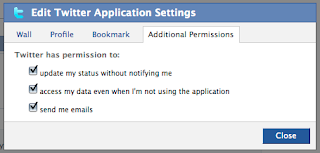
- You will now see a dialogue box to Edit Twitter Application Settings.
- Click on the Additional Permissions tab and you will see a listing of options.
- Check the option to "update my status without notifying me" and save your changes.

- You're done!
- Configuring Twitter on the OLD Facebook is much easier than the NEW Facebook.
- First, login to Facebook.
- Then go to the Facebook Twitter Application and click the Add Application button.
- Make sure to give Facebook all the permissions it needs to access your profile.
- Enter your Twitter username and password when asked.
- Once you have entered your username/password, simply click the button in the Twitter Facebook Application that says "Allow Twitter to Update Your Facebook Status".

- You're done!


 Posts
Posts

